
nStudio™
The Daqscribe Software Ecosystem for High-Speed Ethernet Data
Capture. Preserve. Analyze. Reuse.
Explore the modules
Capture & Replay
Data Intelligence
nRec
High-speed Layer 2 Ethernet capture and recording
- High-speed Layer 2 Ethernet traffic
- Recording sessions, runs, and files
- Timing and event context
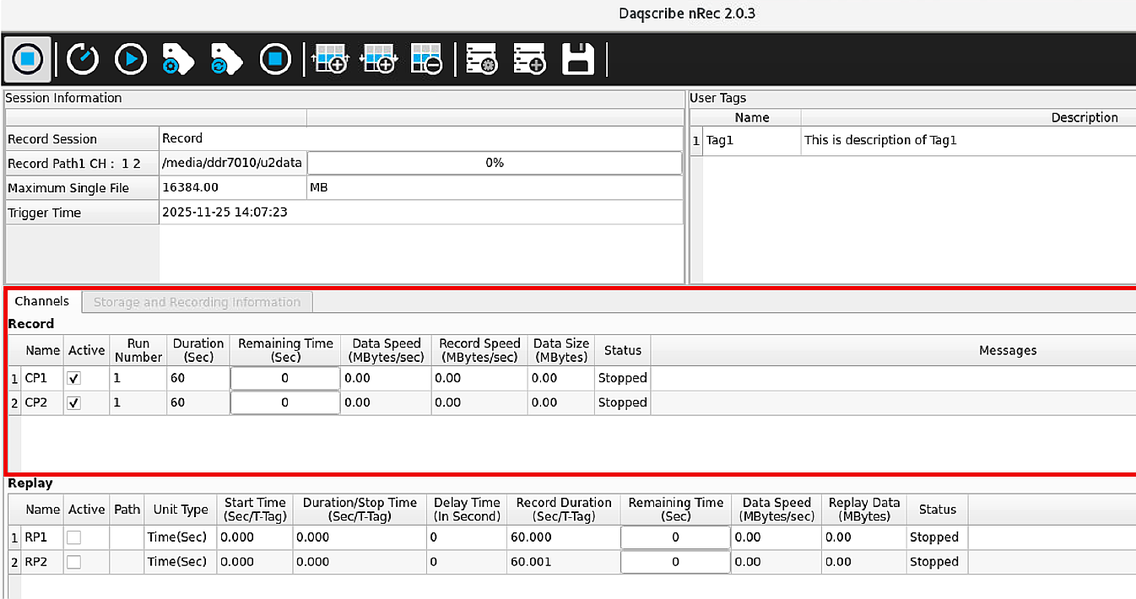
nRec screenshot — supplied by Daqscribe
nStudio brings high-speed Ethernet capture, precision replay, intelligent data discovery, and workflow automation into one modular software ecosystem.
From capturing high-speed Ethernet traffic to preserving its timing and mission context, analyzing vast recordings, and reusing data for testing and AI/ML workflows, nStudio connects the work that follows acquisition. High-speed Ethernet recording is only the beginning. Engineers also need to preserve timing, recreate field conditions, organize incoming traffic, and find meaningful information across massive recording archives. nStudio connects these capabilities in a modular Daqscribe software ecosystem.
The four pillars describe customer value, not a fixed application sequence.
MDP and nDiscovery transform large recorded datasets into searchable, navigable information for analytics and AI/ML preparation.
One Ecosystem. Multiple Ways to Work.
nStudio is modular: recording and replay can be deployed together or independently according to the use case, while filtering, channelization, remote control, developer utilities, and data intelligence add capabilities where they are needed.
There is no required application sequence. nRec and nPlay are complementary peers; MDP and nDiscovery work with recorded data; and the remaining tools extend the workflow at the source, at the controls, or during engineering validation.
Data Intelligence
nRec captures high-speed Layer 2 Ethernet traffic, organizing recording sessions, runs, and files with timing and event context. It gives engineers a dependable record of real network activity.
Scroll horizontally to view the full diagram.
This is for demonstration purposes only.
Capture, record, playback, remote control (automation)
Alongside nRec, nPlay reproduces recorded Ethernet traffic to a network or system under test. Original-timing playback preserves packet sequence and timing characteristics; configurable playback speeds support additional test conditions.
Together, they support Capture, Preserve, and Reuse: record representative network activity with its context and reproduce it throughout development, integration, and validation.
Scroll horizontally to view the full diagram.
This is for demonstration purposes only.
Precision Timing Across the Recording Environment
Accurate data is valuable. Accurately timed data is actionable.
- Capture Timestamps
- IEEE 1588 PTP
- 1PPS Timing References
Common Context
Across sensors, interfaces, and systems, timing gives individual packets a common context.
Synchronized Acquisition
On supported Daqscribe hardware, capture timestamps, IEEE 1588 PTP, and 1PPS timing references support synchronized acquisition and event correlation.
Event Annotations
Event annotations connect key operational moments to the recording.
Intelligent Packet Filtering & Channelization
pFilter™ | Capture the right data. Organize it at the source.
Mixed Ethernet traffic can be classified and organized before recording. Within the FPGA Smart Capture path, pFilter provides real-time inline filtering, packet classification, and channelization to create relevant logical recording streams.
- Rules based on ports, IP addresses, protocols, and packet content can direct traffic into dedicated channels.
- Optional packet slicing reduces stored data when appropriate.
- Channelization also adds value when the goal is to separate streams rather than discard packets.
The result is focused, structured datasets that are easier to record, manage, and analyze.
Available operations depend on Smart Capture hardware and configuration.
This is for demonstration purposes only.
Bring nStudio into Your Control Environment
nRemote™ | Operate recording and replay from your own system.
nRemote links nRec and nPlay with external test, mission, and control applications through TCP/UDP command and status interfaces. Teams can configure sessions, control recording and replay, monitor status, and register events remotely.
Instead of changing their established workflows, teams can integrate Daqscribe systems into them.
Engineering Tools for Faster Validation
nXplorer™ | Essential Ethernet utilities in one developer workspace.
For FPGA, SDR, firmware, and embedded development, nXplorer brings Layer 2 monitoring, packet generation, controlled capture, replay, and NTCAP-to-PCAP conversion into a lightweight graphical interface.
It helps engineers validate links, troubleshoot interfaces, and repeat representative traffic tests without launching a full production recording session.
From Massive Recordings to Actionable Data Intelligence
MDP™ + nDiscovery™ | Find the needle in the haystack. Prepare the data that matters.
Analyze means more than inspecting packets. Large recording campaigns can produce thousands of files and petabytes of captured information. The harder problem is finding the relevant event, extracting the right portion, and preparing useful data for downstream analytics and AI/ML workflows. MDP and nDiscovery address that challenge together.
Scroll horizontally to view the full diagram.
This is for demonstration purposes only.
MDP™ | Metadata intelligence and packet indexing
MDP parses recorded capture data into indexes that associate packet characteristics, timestamps, and file locations. This searchable foundation helps applications identify points of interest without repeatedly scanning entire recordings.
nDiscovery™ | Explore, organize, and prepare selected datasets
nDiscovery organizes sessions and runs in a searchable workspace. Its Recording Map helps engineers navigate large collections, manage and transfer recordings, and select relevant regions for external tools such as Wireshark and GNU Radio. The selected data and metadata provide an AI/ML-ready data foundation for further processing, labeling, analysis, and model pipelines; they are not automatically finished, labeled training datasets.
MDP builds the index. nDiscovery makes recorded data findable, navigable, and ready for the next analytical step.
From the Full Recording to the Point of Interest
Start with a recording-run overview, zoom into a time interval, and navigate toward the event, file, timestamp, or packet that matters. With MDP indexing where enabled, the Recording Map shortens the path from petabyte-scale storage to a focused data selection.
See the recording. Find the moment. Prepare the data for analysis.
Future Expansion: AI-Assisted Data Queries
nQuery™ | Planned standalone LLM/RAG application — under development.
nQuery is being developed as a separate nStudio package using large language models and Retrieval-Augmented Generation (RAG). It is intended to help users explore indexed recording information through natural-language queries, building on the searchable metadata foundation created by MDP and used by nDiscovery.
Future capability: nQuery is under development, is not currently a shipping nStudio or nDiscovery feature, and is intended for natural-language exploration of indexed recording information.
Built for Real-World Data Challenges
Test & Evaluation.
Preserve field traffic and reuse realistic stimuli as hardware and software change.
Radar, EW & Mission Systems.
Record high-rate streams with timing and event context, then locate critical intervals for investigation.
RF / SDR Development.
Validate packetized RF and IQ traffic, and prepare selected regions for signal-processing tools.
Cyber & Network Analysis.
Navigate large Layer 2 archives to isolate events and packet ranges worth investigating.
FPGA & Embedded Development.
Monitor, generate, capture, and replay representative traffic during interface bring-up.
Automated Test Environments.
Connect recording, replay, status, and event controls to existing test frameworks.
Integration with nStudio.
nStudio™ Software Ecosystem: Capture. Preserve. Analyze. Reuse.
- nRec™
- High-speed Layer 2 Ethernet capture and recording
- nPlay™
- Timing-preserving Ethernet replay with original or user-defined playback speed
- pFilter™
- Inline packet filtering, classification, channelization, and optional slicing
- nRemote™
- External command, status, and operational automation
- nXplorer™
- Developer-oriented monitoring, generation, capture, and replay utilities
- MDP™
- Packet metadata intelligence and indexing for large recorded datasets
- nDiscovery™
- Recording discovery, navigation, management, and analytics preparation
Ordering information.
- nStudio Software Suite
- Integrated software environment supporting recording, discovery, management, analysis, and replay workflows.
- Evaluation & integration
- Contact Daqscribe to confirm platform compatibility, licensing, and deployment requirements.
- Support & maintenance
- Software updates, technical support, and maintenance options are available by quotation.
Build the nStudio Environment That Fits Your Mission
Choose the capabilities your team needs today and extend the same Daqscribe ecosystem as your needs for replay, intelligent data discovery, remote automation, and AI-ready data preparation evolve.Capture. Preserve. Analyze. Reuse. Channelize traffic at the source, find the data that matters, and expand toward AI-assisted exploration.
Not a pricing question? Contact us for general inquiries, or reach the support portal if you already own the hardware.
Global Headquarters