
nRec™
Capture with Precision. Preserve the Packets That Matter.
High-speed Layer 2 Ethernet recording designed for lossless capture within validated hardware, throughput, and configuration limits, with hardware time stamping, structured sessions, event annotation, and real-time visibility.
Configured Ethernet traffic flows through nRec into segmented recording files on supported Daqscribe capture platforms. A filled file moves into the completed stack, and the next file receives subsequent packets. This illustrates one channel-specific Run; packet marks, file count, and animation speed are illustrative, not performance specifications.
Packet Data and Its Acquisition Context
nRec records configured high-speed Ethernet traffic on supported Daqscribe capture platforms, preserving captured packet data and its acquisition context.
Organize Traffic Before Storage
Where pFilter is configured, selective capture or stream channelization can organize traffic before storage.
Without Requiring Interpretation
Protocol-agnostic Layer 2 capture retains Ethernet frames without requiring interpretation of higher-layer traffic.
Scroll horizontally to view the full diagram.
This is for demonstration purposes only.
Capture with Precise Hardware Time Stamping
FPGA-based capture hardware timestamps packets as they arrive, rather than reconstructing timing afterward in software. IEEE 1588 PTP and 1PPS references support time-correlated acquisition across capture channels and supported systems.
This is for demonstration purposes only.
Structured Recording: Sessions, Runs, and Files
Define a Session and configure capture channels, storage, file segmentation, and recording triggers. nRec organizes each channel-specific Run into segmented packet files with associated metadata, keeping long-duration recordings traceable and manageable.
Capture / Record Settings
The GUI settings determine the folder names and the maximum size of each .pcap file.
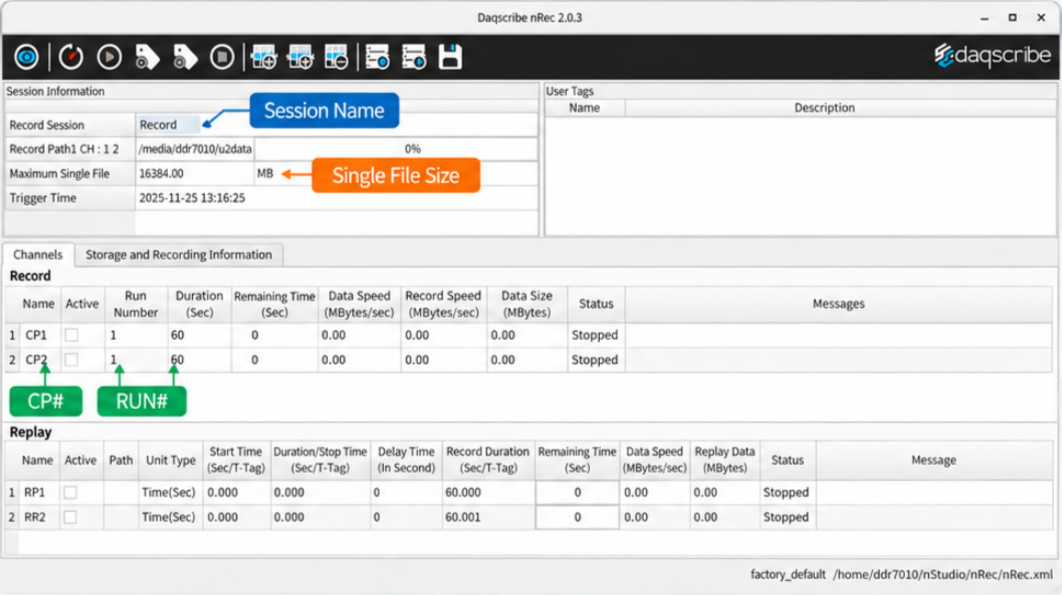
Session Name
Your chosen session name becomes the parent folder name and the prefix of each subfolder.
Single File Size
Sets the maximum size of each .pcap file within the run folder.
Capture Port (CP)
The middle number identifies the capture port. Each capture port has its own subfolder for the run.
Run Number
The last three digits identify the run: 001, 002, and so on.
Record File Structure
Session Subfolders Files
Folder naming key
Session NameSession1CP001RunSingle File Size → .pcapEach .pcap file is capped at the size set in the GUI.
- Session Name/Parent Folder · Session Name
Session Name_1_001/Subfolder · CP1 · Run 001
1.pcapCaptured Data2.pcap3.pcap- …
.rec.tagEvent Annotations
Session Name_2_001/Subfolder · CP2 · Run 001
1.pcapCaptured Data2.pcap3.pcap- …
.rec.tagEvent Annotations
This is for demonstration purposes only.
Event Annotation and User Tags
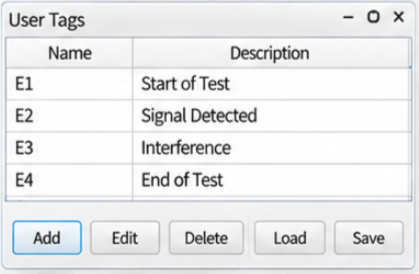
Mark significant moments while recording continues. User-defined event tags link an Event ID and note with a 64-bit Time Tag, local computer time, and the associated recording file, making the relevant traffic easier to find during review.
Recording · High-Speed Capture
Recording continues across every file. User input adds annotations only to selected files.
Event Log
| File | Tag | Event | Time |
|---|
User-Defined Event Tags
Event tags are user-defined and can be changed. Pause, edit a description, then replay to see it logged.
This is for demonstration purposes only.
Real-Time Snapshot Monitoring
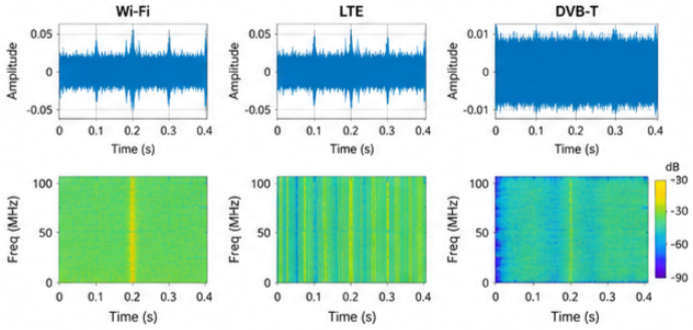
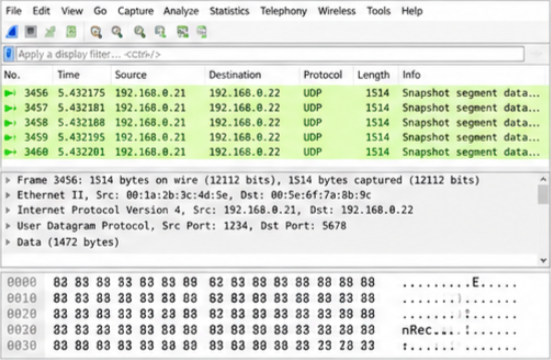
Continuous full-rate recording and live analysis can run in parallel. nRec makes periodic packet-data snapshots available through an API for external decoding and visualization in GNU Radio, MATLAB, or custom applications. Typical snapshots are 1-10 segments per second, approximately 1-2 MB each.
Scroll horizontally to view the full workflow.
External Applications · Examples
Real-Time Spectrum Monitoring
Wi-Fi, LTE and DVB-T examples.
Snapshot Data in an External Application
Packet inspection example.
This is for demonstration purposes only.
Capture. Preserve.
Record configured Layer 2 Ethernet traffic with hardware timing and event context in structured nRec sessions. Reuse these recordings through complementary nPlay workflows.
Integration with nStudio.
nStudio™ Software Ecosystem: Capture. Preserve. Analyze. Reuse.
- nRec™
- High-speed Layer 2 Ethernet capture and recording
- nPlay™
- Timing-preserving Ethernet replay with original or user-defined playback speed
- pFilter™
- Inline packet filtering, classification, channelization, and optional slicing
- nRemote™
- External command, status, and operational automation
- nXplorer™
- Developer-oriented monitoring, generation, capture, and replay utilities
- MDP™
- Packet metadata intelligence and indexing for large recorded datasets
- nDiscovery™
- Recording discovery, navigation, management, and analytics preparation
Ordering information.
- nStudio Software Suite
- Integrated software environment supporting recording, discovery, management, analysis, and replay workflows.
- Evaluation & integration
- Contact Daqscribe to confirm platform compatibility, licensing, and deployment requirements.
- Support & maintenance
- Software updates, technical support, and maintenance options are available by quotation.
Build the nStudio Environment That Fits Your Mission
Choose the capabilities your team needs today and extend the same Daqscribe ecosystem as your needs for replay, intelligent data discovery, remote automation, and AI-ready data preparation evolve.Capture. Preserve. Analyze. Reuse. Channelize traffic at the source, find the data that matters, and expand toward AI-assisted exploration.
Not a pricing question? Contact us for general inquiries, or reach the support portal if you already own the hardware.
Global Headquarters
More on nRec
Spectrum Research & Operations
Record & Compute flow Signals & Electronic Warfare Electromagnetic Sensing and Analytics Wide-band digital receivers Radio frequency system-on-a-chip Digital signal processing Daqscribe Ethernet...
Read more Technical ArticleAnnual Software and Interface Support (ASIS)℠
Daqscribe’s premium software maintenance and support program that covers all software in the Daqscribe nStudio product suite.
Read more Technical ArticlenRec 2.0 | What’s New
Daqscribe’s nRec v2.0 offers significant improvements in recording flexibility, playback accuracy, and remote-control functions, along with some thoughtful workflow enhancements.
Read more MediaJED Magazine | June 2025 Issue
In the June 2025 issue of JED Magazine, we shared a message that reflects the heart of our mission: “Daqscribers finding Diamonds in Every Recording!”
Read more Technical ArticlepFilter™ by Daqscribe
pFilter™ is Daqscribe's inline Smart Capture module — rule-based packet filtering, slicing, and stream classification applied at line rate, before nRec™ writes anything to storage.
Read more Technical ArticleChoosing the Right Daqscribe Ethernet Recorder for Your Mission
Choosing the right Daqscribe Ethernet recorder starts with your mission’s data flow and performance needs. VP Michael Powell explains how to select between the MDR, DDR, and XDR families for zero...
Read more