
Overview
This technical note explains the Local Port Retransmission feature in Daqscribe’s Ethernet recorder systems. Local port retransmission, in networking, refers to a SmartNIC resending received network traffic on the same device without involving the host CPU. For instance, a SmartNIC with local retransmission can receive packets on one port and then forward them out on another port on the same device, with minimal delay.
Purpose
Local Port Retransmission enables the real-time forwarding, loop-through, or mirroring of network traffic. This feature is handy in applications like:
- Inline traffic recording and monitoring
- Load balancing: Spreading network traffic across multiple servers by retransmitting packets from a monitoring device to various servers
- Mirroring: Duplicating network traffic to multiple destinations, such as security analysis tools
- TAP (Test Access Point): Network troubleshooting and diagnostics
Functional Description
The FPGA-based SmartNIC used in Daqscribe Recorders supports hardware-level retransmission. Packets arriving on one port can be retransmitted on the same or another port with extremely low latency and without CPU intervention. The retransmission process is handled entirely within the NIC’s FPGA logic.
Key Characteristics:
- Operates at the full data rate of up to 100 Gbps per port
- Low-latency forwarding at the microsecond level
- Nanosecond-level timing accuracy maintained
- Configurable behavior for each port
- Deterministic performance with minimal jitter
Use Cases for Local Port Retransmission
| Use Case | Description |
|---|---|
| Inline Tap Mode | Record and retransmit live traffic without interrupting data flow |
| Real-Time IDS/IPS | Deliver traffic to an intrusion detections system (IDS) or intrusion prevention system (IPS) while simultaneously recording |
| Replay Validation | Inject recorded or live traffic back onto the network for testing |
Application Example: “Local Retransmit of RoCE v2”
Switch-Free Configuration Options
The following configurations enable full observability without relying on mirrored traffic from a switch fabric.
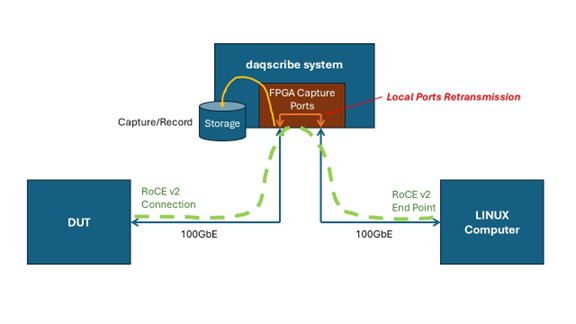
- The DUT and RoCE endpoint are linked directly via the Daqscribe FPGA capture ports.
- All traffic is captured and retransmitted instantly – no external switch needed.
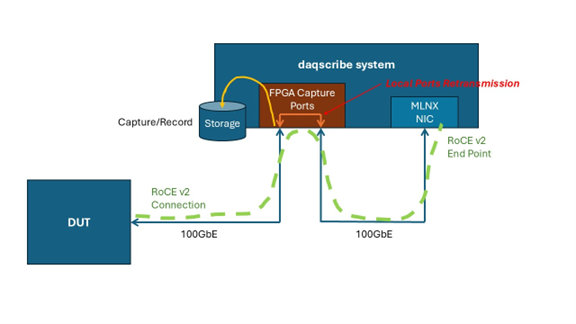
- Adds a SmartNIC to the Daqscribe system to actively establish a queue pair with the DUT.
- All traffic, including NIC-originated RDMA exchanges, is routed through the FPGA capture ports and logged.
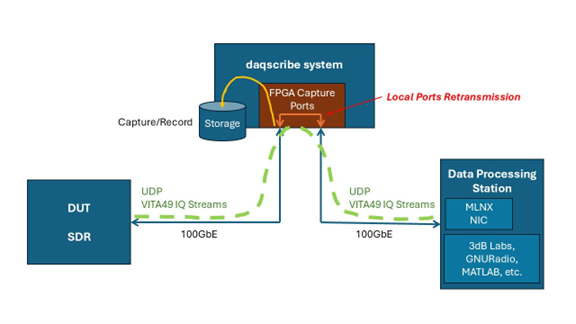
- The DUT/SDR and Data Processing Station endpoints are directly connected via the Daqscribe FPGA capture ports.
- All traffic is captured, retransmitted through FPGA capture ports, and recorded.
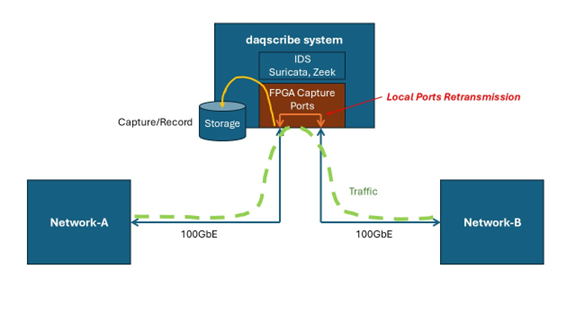
- Two networks are designated as endpoints and are connected directly through the Daqscribe FPGA capture ports.
- Suricata and Zeek are examples of IDS or IPS software running on a Daqscribe Recorder, analyzing in-line network traffic while recording at full speed.
Configuration
Local Port Retransmission can be configured through:
- Via system configuration scripts (file format) or from the GUI (future)
Example Port Mapping:
- Port 0 → Port 1 (bidirectional pass-through)
- Port 2 → Port 3 (loop-back testing)
System Requirements
- Daqscribe Recorders featuring SmartNIC technology with firmware supporting local port retransmission.
- Proper cooling and power supply for full-speed operation.
Notes & Considerations
- Retransmission happens at Layer 2 and does not involve protocol stack inspection.
- Filtering, timestamping, and other analytics remain supported simultaneously.
Support
For technical support or questions related to this feature, contact us!